A simpler way to move freight with Phoenix
Distribution and 3PL teams talk about cross-dock constantly, yet many WMS implementations still treat it as a checkbox on receiving setup. In practice, cross-dock is a closed loop: configuration, automated matching, human approval, mobile execution, and audit.
Miss any step and freight quietly drifts back into putaway. That adds touches, burns labor, and erases the reason you enabled cross-dock in the first place. Phoenix keeps the loop on one AI-native platform so the dock, the supervisor, and the outbound wave share the same match.
This article is part of the flow-through freight series. Read it alongside transload operations, where cross-dock is the engine inside a broader deconsolidate-and-reconsolidate model.
What Is WMS Cross-Docking?
Cross-docking is receiving inbound product and routing it directly toward outbound fulfillment—staging, sort, or ship—without putting it away into storage locations first. The inbound document, often an ASN, is tied to demand that already exists: a sales order, a transfer, a retail allocation, or a pool truck being built on the outbound dock.
Physically, the clerk still scans cartons or pallets at the dock. Digitally, the WMS must answer three questions before anyone touches a case: Is there outbound demand for this receipt? How much should divert? Where should it go right now? Cross-dock is not “skip location on receive” as a hack. It is match-driven flow-through with an audit trail.
Match
Compare open inbound expectations against outbound demand inside a configurable window and propose a cross-dock task. Nothing diverts until that proposal exists.
ASN + demand windowApprove
A supervisor accepts or rejects the match. Approval is the contract that receiving will divert matched quantity to a staging lane instead of putaway.
Human gateExecute
ASN Cross-Dock Receive walks the clerk from bench scan through quantity and a sort-to-lane confirmation. The workflow ends in outbound staging, not a directed putaway.
Mobile + staging laneBecause Phoenix is an AI-native WMS, that loop sits in the same operational context as receiving, inventory, and outbound execution. AI-assisted workflow tooling can recognize cross-dock intent in natural language when a building is stood up, while approved tasks and scan discipline keep the floor in control.
Cross-Dock vs. Transload
These terms are often used interchangeably. They should not be.
| Cross-dock | Transload |
|---|---|
| A technique inside the WMS: match inbound to outbound and skip storage. | An operator business model: deconsolidate inbound freight, sort by pool or destination, and reconsolidate onto outbound truckloads. |
| Typical building is a distribution center or 3PL warehouse with known orders. | Typical building is a transload facility or sort floor, with hours of dwell, not weeks of storage. |
| Demand is often a specific order line or transfer waiting to ship. | Demand is frequently pool- or endpoint-based and may combine many inbound sources onto one load. |
| In Phoenix: match queue, board, and mobile receive and sort executors. | Adds inbound decon, pool masters, load building, and a transload board, built on top of flow-through. |
If you run transload, you need cross-dock behavior at decon time: when a carton’s destination is known, it must not receive a putaway task. If you run a traditional DC, you may never break ocean containers, and you still want cross-dock when retail orders or transfer waves are waiting. The transload operations guide covers pools, minimum touches, and load building. This article covers the match-and-divert machinery both models share.
Why Operators Cross-Dock
Every putaway-and-pick cycle costs labor twice: once to store, once to retrieve. Cross-dock removes the storage step when timing and demand align.
2× fewer touches
Fewer material-handling steps versus receive-putaway-pick when flow-through applies.
Same-day cycles
Faster order cycle when inbound lands the same day outbound must ship.
Less congestion
Forward pick and reserve stay clearer when hot freight never sits down.
E-commerce operations use cross-dock for high-velocity SKUs tied to open customer orders. Automotive and JIT programs use it when inbound ASNs must feed line-side or outbound sequencing the same shift. 3PLs use it when a client’s inventory is effectively in motion, not in the racking. In every case, the WMS must make the divert explicit so billing, compliance labels, and labor standards reflect what actually happened on the floor.
How Phoenix Powers Cross-Docking
Behind the board is a matcher that compares open inbound expectations—ASN lines, PO lines, or receipt candidates—against outbound demand inside a configurable time window. When it finds a viable link of product, quantity, facility, and timing, it creates a proposed cross-dock task. Nothing diverts until a human approves that proposal, unless your governance model later automates high-confidence matches.
From inbound door to outbound lane
Configure the window, refresh proposals, approve the match, then receive and sort on mobile. The same context follows the carton.
1. Match
Windowed inbound-to-outbound proposal
2. Approve
Supervisor accepts or rejects
3. Receive
ASN Cross-Dock Receive
4. Sort
Scan the staging lane
5. Ship
Outbound picks up the lane
Receiving setup
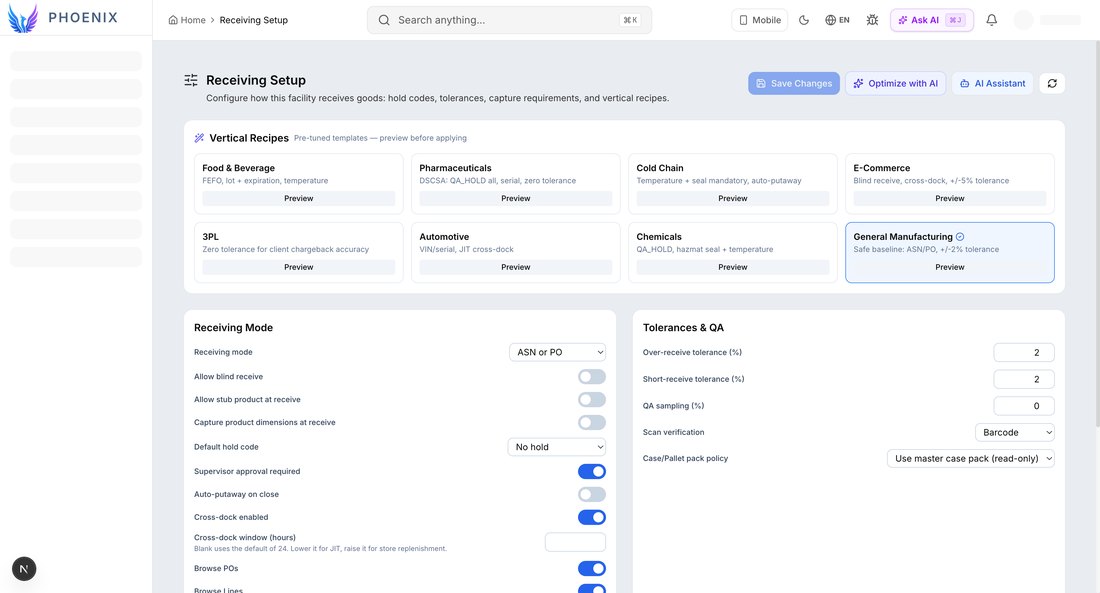
Cross-dock is a facility policy, not a per-clerk preference. Receiving setup loads the baseline for the building before you change anything for a pilot lane.
- Confirm baseline. Open receiving setup and document the current cross-dock settings so you can roll back.
- Enable cross-dock. Toggle Cross-dock enabled. The window-hours field appears only while enabled.
- Set the window and save. Enter hours between 1 and 168, save, then refresh the board and confirm proposed tasks match the window you intended.
Vertical presets hint where cross-dock is common: e-commerce profiles mention blind receive and cross-dock together; automotive profiles call out JIT cross-dock. Those presets are starting points. Match rates still depend on order release timing, ASN quality, and staging lane capacity.
The cross-dock board
Supervisors work from the Cross-Dock screen: table, report, or board views over live tasks. Analytics cards summarize candidates, approved, in progress, and rejected volumes so the control tower sees backlog before the dock does.
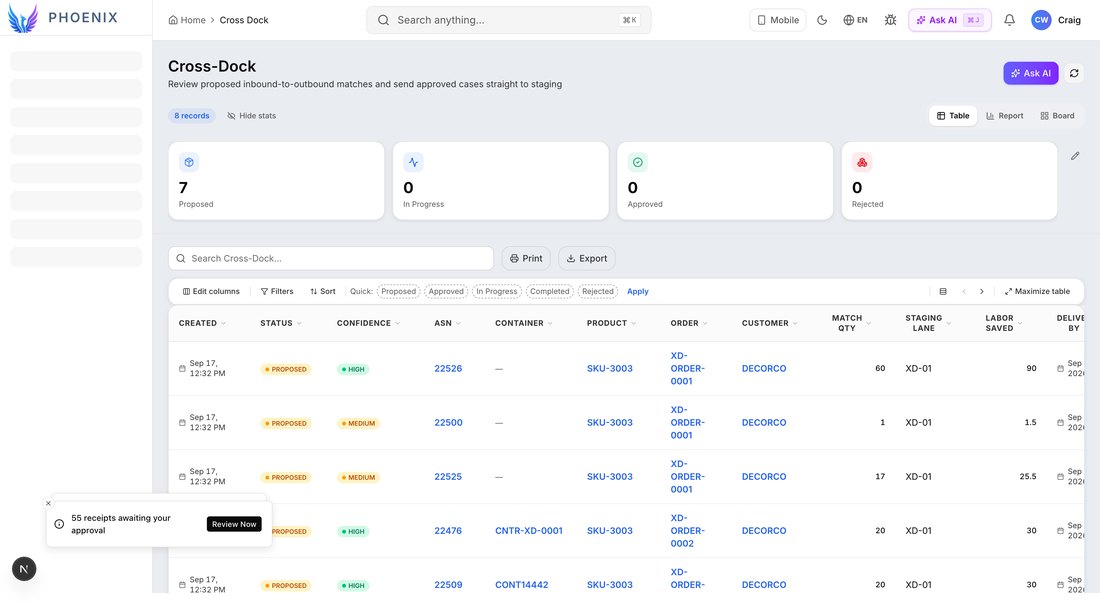
Each task carries the identifiers clerks recognize on the floor: ASN, product, matched quantity, sales order or demand reference, and the staging lane where approved freight should land.
- Proposed — matcher suggestion awaiting approval.
- Approved — receiving may divert matched quantity to the staging lane instead of putaway.
- In progress — mobile receive or sort underway.
- Completed — divert finished; audit closed for that match.
- Rejected — supervisor declined the match, with a reason captured for later analysis.
Opening a row launches a detail panel with full context and approve or reject actions. When a matcher run completes, the UI can show how many fresh proposals arrived so the board does not look stale during receiving peak.
Approving and rejecting matches
A proposed match might be technically valid and operationally wrong: staging lane full, outbound wave cancelled, quantity mismatch, or a retailer compliance hold. Supervisors need a fast approve path and an equally fast reject path with a reason.
On approve, Phoenix confirms that receiving will divert matched quantity to the configured staging lane instead of putaway. Clerks are not receiving “to the building” in the usual sense. They are receiving to a lane already tied to outbound demand.
Rejections should feed continuous improvement. If the same SKU fails because order release happens after the ASN arrives, fix the planning cadence or widen the window. If matches are wrong because master data links the wrong ship-to, fix master data.
Mobile ASN Cross-Dock Receive
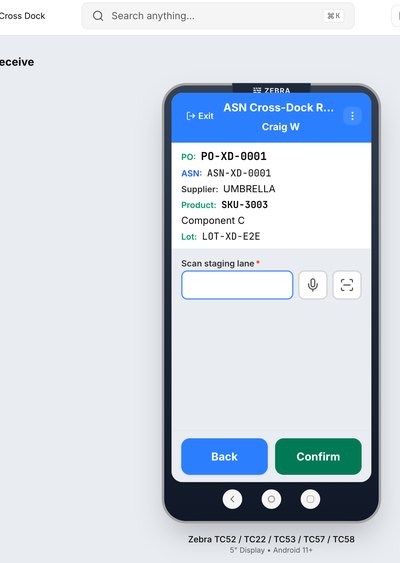
Desktop approval means nothing if the dock still runs generic receiving. Phoenix ships the ASN Cross-Dock Receive mobile workflow for scan-gun execution on standard rugged devices.
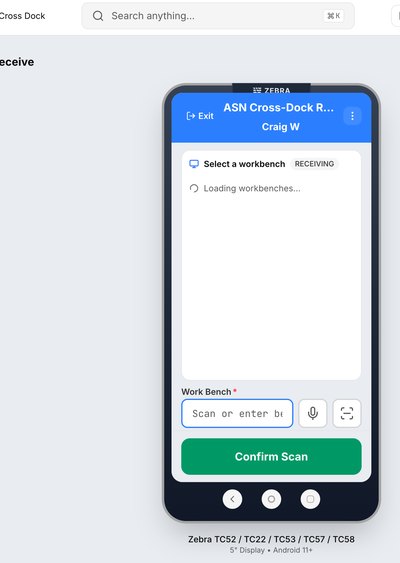
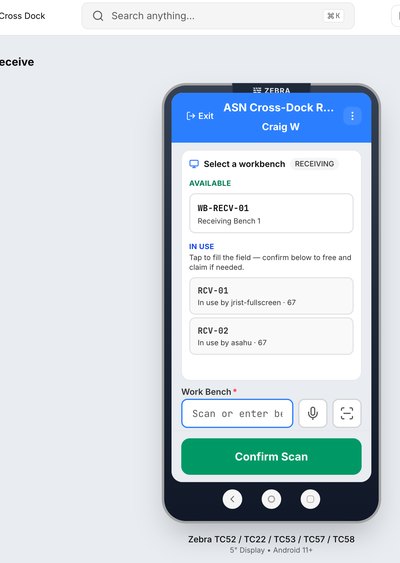
- Start the workflow. The clerk launches ASN Cross-Dock Receive.
- Scan the receiving work bench. For example WB-RECV-01, which anchors labor and location context.
- Scan the ASN. The session claims the inbound document with an approved match waiting.
- Scan the product. The physical case is checked against the ASN line.
- Capture lot and expiration when tracked, then confirm quantity and receive.
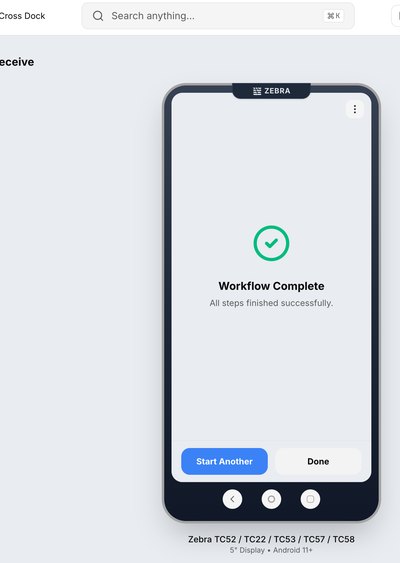
- Sort to the lane. Scan the staging lane, for example XD-01, and confirm. The workflow completes with a divert to outbound staging.
Wrong LPN or SKU scans should hard-stop with clear validation messaging, not silent putaway.
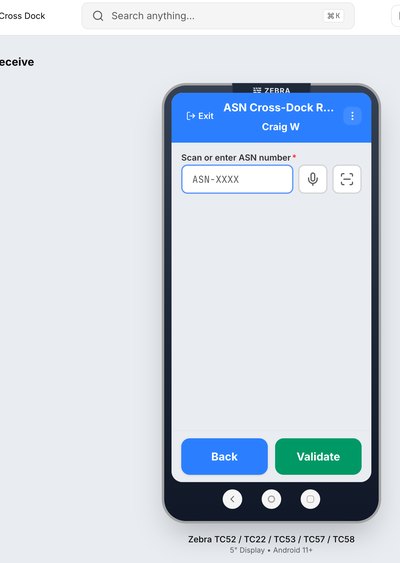
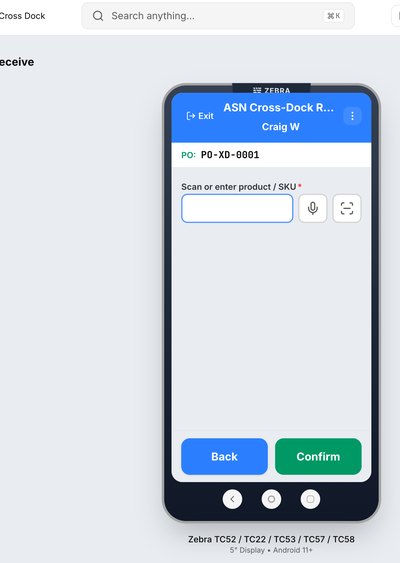
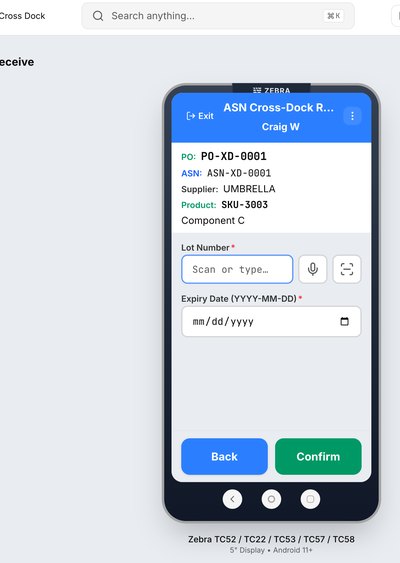
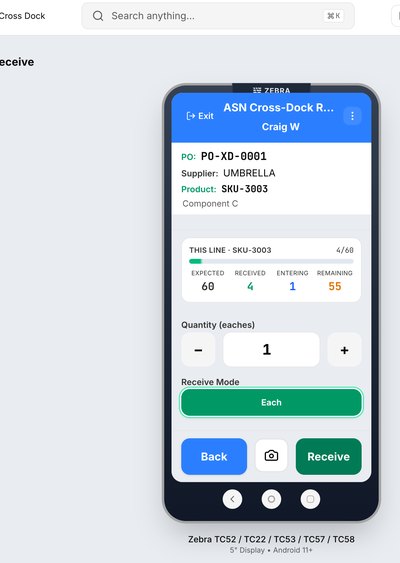
Sort to staging, and the transload next step
In classic distribution cross-dock, the staging lane is the handoff to outbound: pick, pack, or load building from a forward staging area already associated with the order wave. Clerks scan the lane barcode so the WMS records where the inventory sits during its brief dwell.
In transload operations, the next step is to tie divert targets to an outbound load or pool lane, not only a static staging location, so freight does not have to be married to a truck by memory later. Wholesale truckload patterns cover the outbound half. Cross-dock covers the inbound divert. Together they implement the minimum touches described in the transload article.
Workflow builders connect executors such as cross-dock-scan and cross-dock-sort into facility-specific paths. The floor still wins or loses on scan discipline and lane signage.
When Cross-Dock Fits
Good fit
- Outbound orders or transfers already released before the ASN arrives
- High-velocity SKUs with predictable pairings
- Retail or JIT programs with staging lanes per route or customer
- Transload decon when destination or pool is known at strip time
- Facilities measured on dock-to-ship time
Poor fit without another process
- Blind receiving with no demand signal
- Long-term storage or seasonal hold programs
- ASNs that arrive days before order release, unless the window covers the gap
- No staging capacity at the outbound dock
- Programs that require a full QC hold in reserve before any divert
Where Cross-Dock Programs Break
A flag on receiving setup can still produce labels and receipts. It does not keep freight moving. When match, approval, and the mobile path live in different habits, teams fall back to putaway and reconcile later.
| The failure | What to do instead |
|---|---|
| Cross-dock is enabled, but clerks use standard receive | Train and meter: ASN Cross-Dock Receive only after approved tasks exist |
| The board is never refreshed after a window change | Refresh the matcher and verify proposed counts before peak receiving |
| Matches are approved with no lane capacity | Coordinate with outbound; reject or hold until the lane or load is ready |
| Transload diverts only to a static staging location | Extend to load or pool staging in the transload design |
| Reject reasons are never captured | Require reason text and review it weekly with planning and ASN quality |
Cross-Dock in Phoenix
Phoenix treats cross-dock as a product surface, not a hidden flag.
Receiving setup
Enable cross-dock and configure match window hours per facility.
Board and tasks
Supervisor queue with analytics, a detail panel, and approve or reject.
Matcher refresh
Re-run proposals when demand or the window changes.
Mobile workflow
ASN Cross-Dock Receive through sort-to-lane confirmation.
Workflow executors
cross-dock-scan and cross-dock-sort are composable in SmartTask flows.
AI context
The Cross-Dock route is available for in-app help on match and receive questions.
Pair this module with wholesale truckload and, when the operation requires it, transload inbound decon and pool planning. Warehouse-only operators can live in setup, the board, and mobile receive for years. Transload operators live there every shift.
Key takeaways
- Cross-dock is match-driven flow-through: propose, approve, receive on mobile, sort to a lane.
- Window hours from 1 to 168 control how far the matcher looks. Refresh after changes.
- Supervisor approval is governance. Reject reasons are how ASN and planning quality improve.
- Transload builds on cross-dock. Read both articles if you run sort floors and pool trucks.
- Success is completed approved matches on the dock, not proposal volume on the board.
Rollout Checklist
- Pick one facility and one inbound lane with reliable ASNs and released outbound demand.
- Enable cross-dock in receiving setup, set window hours, save, and refresh the board.
- Approve a small set of matches and confirm staging lane barcodes match physical signage.
- Pilot ASN Cross-Dock Receive with experienced receivers and capture wrong-scan cases.
- Measure the percent of matched quantity that completes without a putaway override, plus reject reasons and dock-to-staging time.
- Expand SKUs and lanes, then widen to transload-style load divert if it applies.
Retest the same clerk steps after every release—window validation, approve and reject, mobile sort—until a full receiving day passes clean. Cross-dock regressions are almost always configuration or training.
Frequently asked questions
What is WMS cross-docking?
It is receiving inbound product and routing it toward outbound fulfillment without putting it into storage first. Phoenix matches inbound freight to outbound demand, a supervisor approves the match, and mobile receiving diverts the freight to a staging lane.
What happens if I clear the cross-dock window field?
Saving with an empty window sends null so the matcher default, typically 24 hours, applies. The window control is shown only while cross-dock is enabled.
Can receivers divert without an approved task?
They should not. Approved tasks are the contract between planning and the dock. An unapproved divert is putaway risk and audit risk.
How does this relate to transload?
Cross-dock is the technique. Transload is the operator model that adds deconsolidation, pools, and load building. See Transload Operations in the WMS.
What mobile workflow should clerks use?
ASN Cross-Dock Receive for matched ASNs: scan the bench, ASN, SKU, lot and expiration when required, quantity, then the staging lane.
Why reject a match instead of receiving to reserve?
When lane capacity, order changes, or quantity trust is wrong, reject with a reason and fix the root cause. Silent putaway destroys cross-dock ROI.
Match inbound freight to outbound demand.
See how Phoenix, our AI-native WMS, proposes cross-dock matches, gets supervisor approval, and diverts freight on mobile without putaway.
Schedule a JASCI demo