In the warehouse, labels are everything. Think of them as the passport for every box that leaves your building, and without the right one, it does not matter how perfectly you picked and packed the order, because the shipment gets turned away at the border. The right label on the right box is what keeps orders moving, carriers happy, and retailers from issuing costly chargebacks.
Yet for most operations, labels remain the single most developer-dependent part of the day. Moving a barcode half an inch or adding a field a retailer suddenly requires means a ticket, a queue, and an invoice.
That is exactly why we built Phoenix Label Studio into the JASCI Phoenix AI-Native Platform, a next-generation label designer that lets your team create, modify, and validate every label the operation needs, without waiting on developers or wrestling with third-party tools.
1. What Label Studio Actually Is
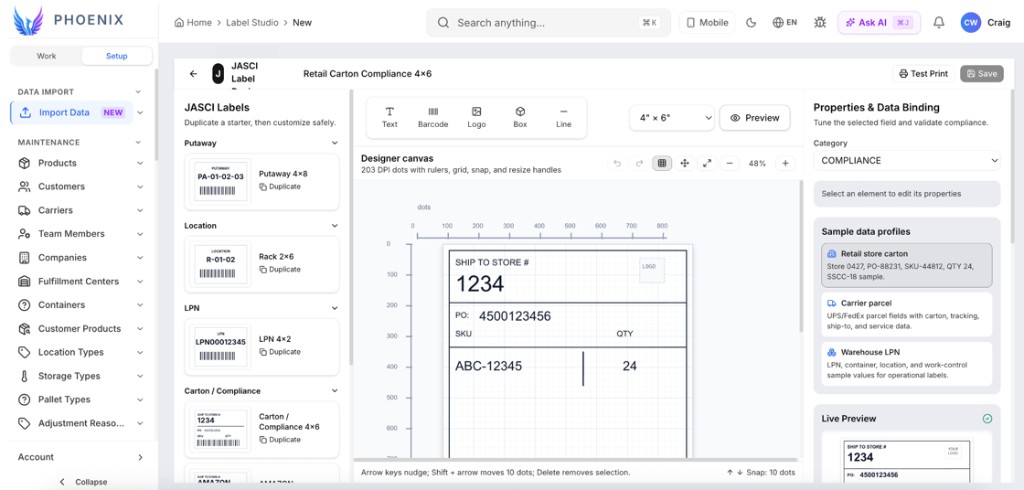
The Label Studio is a drag-and-drop label designer that JASCI has built directly into the Phoenix system. If you have ever used a tool to design a flyer or a slide, you already understand it: you place text, barcodes, logos, boxes, and lines exactly where you want them, and you see the finished label as you build it.
The difference with Phoenix is its connection to your live warehouse data, enabling rapid creation of compliant labels. Instead of typing in an order number or SKU, the label automatically pulls the real-time information: order details, item, quantity, weight, destination, carrier. As part of our AI-native system, the designer uses that shared operational context to help teams turn live data into accurate label configurations faster than a disconnected design tool.
In short: you choose the label template, and Phoenix will accurately insert the live details every time.
2. Why We Built It
For years, changing a label meant filing a ticket, waiting on a developer or a vendor, and paying for custom work. Imagine if every time an airline needed to update the gate number on a boarding pass they had to call someone to redesign the entire ticket, that is what label management felt like. That is slow, expensive, and frustrating when a customer needs a change today. Even worse, the common pattern was to design and customize labels in external software and then integrate that output back into the WMS, one more system, one more integration, one more thing to break.
Label Studio puts the gate agent in charge of their own screen. Warehouses should not depend on outside specialists to do something as routine as adjusting a label. If you can use a computer, you can build and change your labels yourself. The Phoenix AI-native platform makes that self-service model even more valuable by guiding changes in context, reducing developer queues and the handoffs that come with separate systems.
File a ticket and wait on a developer or label vendor to move a barcode.
Drag the barcode where it belongs and save. Minutes, not sprints.
Pay for custom work every time a retailer updates its routing guide.
Open the template, adjust the field, re-validate, publish. No invoice.
Design labels in third-party software, then integrate the output back into the WMS.
Design inside the WMS, bound to live warehouse data. Nothing to integrate.
New 3PL client onboarding stalls waiting on their label formats.
Duplicate a starter template and configure their format on the spot.
3. The Real Cost of Label Errors
A misaligned barcode or missing PO number might seem minor, until you realize it can ground an entire shipment the same way a typo on a boarding pass can keep you off the plane. Retailers enforce label compliance with automatic chargebacks, and the penalties add up fast. Especially when you factor in the additional costs related to this mistake, such as the labor to dispute each claim, expedited freight to hit the delivery window, re-labeling and re-shipping, lost or refused inventory, and damage to your retailer scorecard. Our AI-native system also analyzes error patterns alongside order and compliance data, helping teams identify the costliest failure points before they become recurring chargebacks.
Use the calculator below to estimate how much label errors could be costing your operation, then see how much you could save with Label Studio's built-in validation.
Industry avg: 3,000–10,000
Industry avg: 1–5% without automation
Label/barcode chargebacks run $5–$25 per carton; SSCC-18 errors can reach $500
Annual Label Chargebacks
$9,600
Monthly: $800
With Label Studio (<0.1% error target)
$9,120 saved annually
Estimated annual chargebacks reduced to $480
This calculator uses industry averages and may not reflect your exact costs. Actual chargeback amounts vary by retailer, violation type, and compliance program. Consult your retailer routing guides for specific penalty schedules.
How the formula works:
Annual Chargebacks = Cartons × Error Rate × Cost × 12
True Impact = Annual Chargebacks × 4
Savings = Annual − (Cartons × 0.1% × Cost × 12)
The 4× multiplier reflects industry findings that the true cost of a compliance chargeback runs roughly 3–5× the deduction alone, once you add the labor to research and dispute each claim (15–45 minutes at a ~$100 loaded hourly rate), expedited freight to hit delivery windows (2–3× normal rates), lost or refused inventory, and vendor-scorecard damage. Supply-chain analysts at SPS Commerce estimate the total “blast radius” at three to ten times the chargeback, while the 2026 Chargebacks911 Field Report and BOLD VAN each report merchants lose more than $4 for every $1 deducted.
4. The Drag-and-Drop Designer
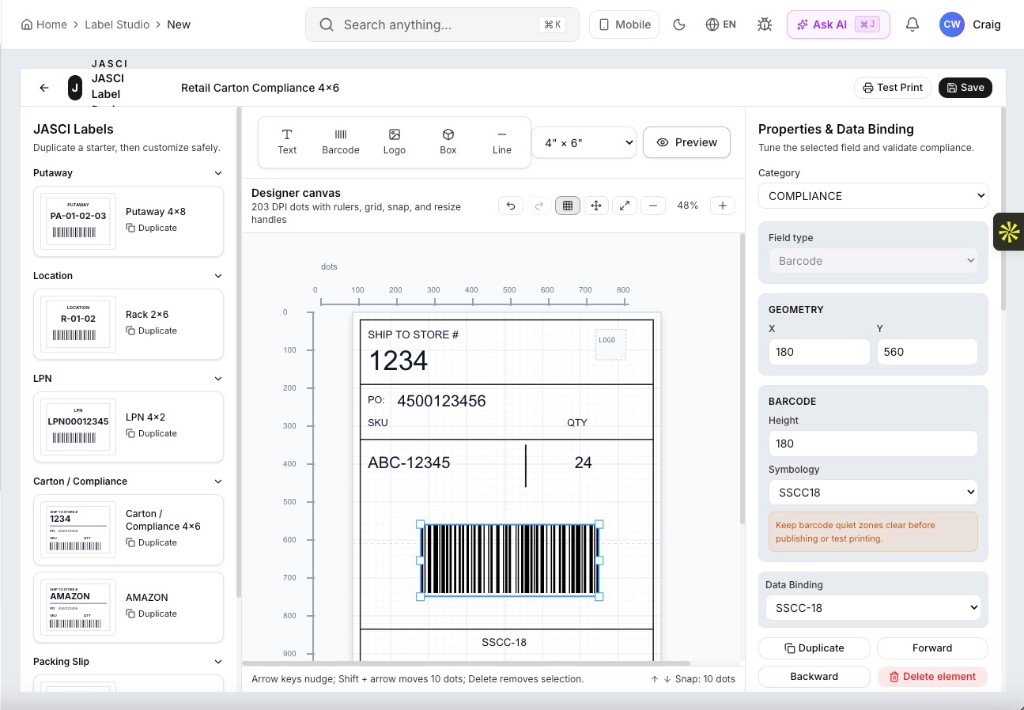
The canvas is a true design surface, not a form. It renders at 203 DPI with rulers, a snap grid, zoom, and resize handles, so what you lay out is what the thermal printer produces. Arrow keys nudge an element a single dot; shift-arrow moves it ten. Within this AI-native workflow, intelligent guidance helps select fields, refine placement, and translate operational intent into a production-ready design with fewer manual steps.
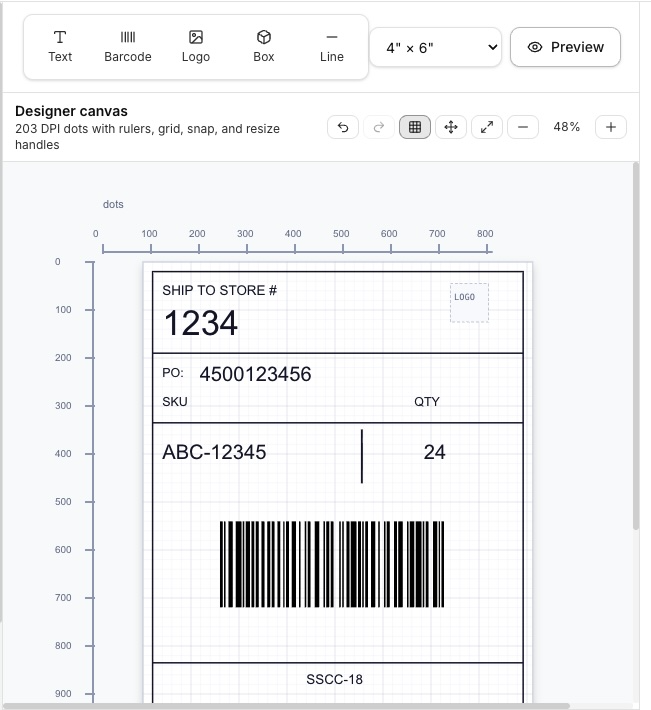
Every element carries precise geometry. Select a barcode and you can set its X and Y position, height, symbology, and data binding numerically, which is useful when a routing guide specifies exact placement rather than "roughly bottom center."
5. 100+ Retailer Compliance Label Templates, Ready to Customize
You do not start from a blank canvas unless you want to. JASCI ships a library of over 100 retailer compliance label templates covering major retailers, club stores, department stores, and specialty chains. Duplicate a starter, then customize it safely, and the original stays intact as your fallback. The Phoenix AI-native system recommends the best-fit starter and helps apply new retailer requirements consistently across the template library as standards evolve.
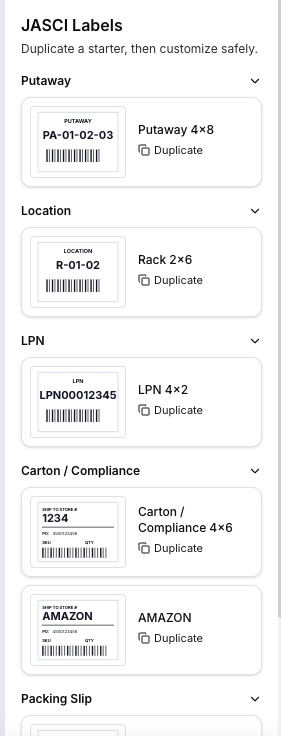
The library is organized by the job the label does, not by an abstract template ID. Putaway, Location, LPN, Carton / Compliance, and Packing Slip each get their own group, with retailer-specific variants like the Amazon carton format sitting alongside the generic 4×6 compliance label.
When a retailer changes its routing guide, you open the affected template, make the change, re-validate, and publish. No ticket, no vendor, no release cycle.
Why duplicate instead of edit? The starters stay pristine so you always have a known-good reference to fall back on, and so a change made for one customer never leaks into another's label.
6. Every Label Type the Warehouse Runs On
Labels are not just a shipping concern. They are the physical index to the entire operation, where every scan, every move, and every handoff depends on one. Label Studio lets you define and control all of them. Because our AI-native system understands workflow context, it surfaces the right label format and data at each step, from receiving and putaway through fulfillment and shipping:
Receiving
Inbound receipt, ASN, and pallet identification labels applied the moment freight hits the dock.
Putaway
Directed putaway labels that carry location, area, and slot sequence for the next handler.
Replenishment
Letdown and restock labels that keep forward pick faces stocked without guesswork.
Locations
Rack, bin, aisle, and zone labels with check digits for scan-verified location accuracy.
LPNs
License plate numbers for cartons, totes, and pallets that travel with the unit end to end.
Compliance
UCC-128 / GS1-128 carton labels built to the routing guide of the retailer you are shipping.
Packing Slips
Multi-page PDF documents with order info, ship-from / ship-to, line tables, and notes.
7. Map Fields Directly to the Database
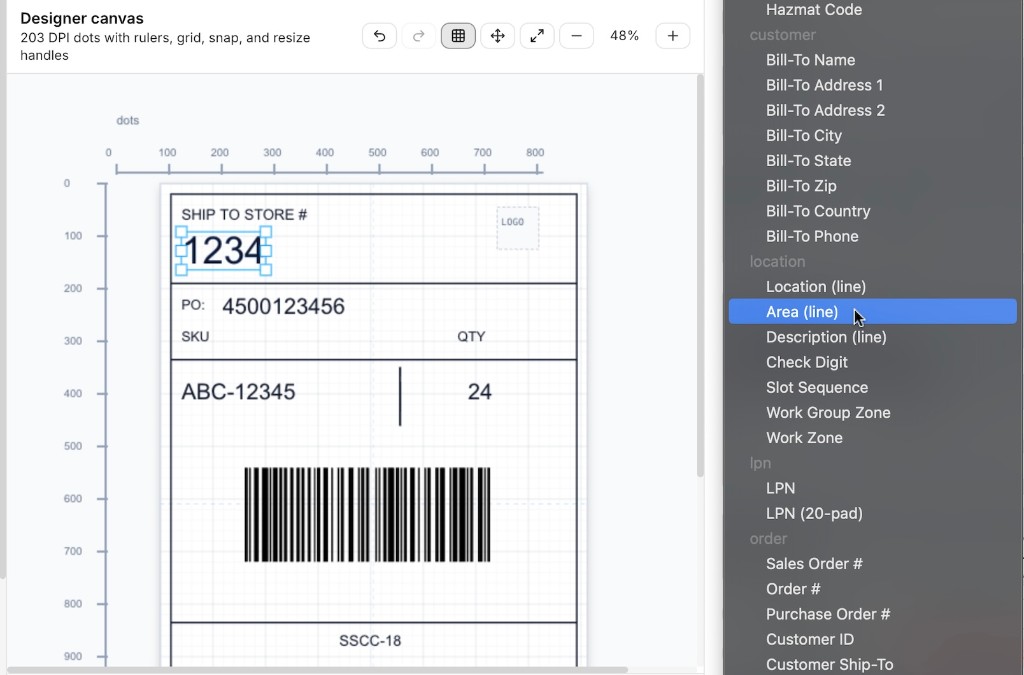
This is the capability that separates Label Studio from generic design software. It works like a boarding pass at the airport: the layout is designed once, and the system fills in the passenger name, flight, gate, and seat at print time with live data. In Label Studio you select any element on the canvas and bind it to a live field in the JASCI database. The dropdown is organized by data set: customer, location, LPN, order, product, carrier, and compliance, so you are choosing a real field, not typing a merge token and hoping it resolves. This AI-native system uses those data sets to suggest the correct live field, reducing mapping mistakes and the risk of printing stale or incomplete information.
Customer
Bill-to name, address, city, state, zip, country, and phone.
Location
Location, area, description, check digit, slot sequence, work group zone, work zone.
LPN
License plate number and 20-character padded variants for fixed-width barcodes.
Order
Sales order number, order number, purchase order number, customer ID, customer ship-to.
Sample data profiles, such as a retail store carton, a carrier parcel, or a warehouse LPN, let you preview each design against realistic values before a single label reaches a printer.
8. Barcodes, Symbologies & ZPL Code
Barcodes are where compliance labels usually fail. Label Studio treats them as first-class objects: choose the symbology, set the exact height and position, bind the encoded value to a database field, and get an inline warning to keep quiet zones clear before you publish or test print. The Phoenix AI-native system combines business context with printer and symbology rules to guide ZPL generation and flag barcode configurations that are likely to fail before they reach the floor.
ZPL Generation, Built In
Designs render to ZPL for direct-thermal and thermal-transfer printers. Because the canvas is measured in printer dots at 203 DPI rather than screen pixels, the output on the label matches the layout on screen, with no trial-and-error reprint cycle to find out where the barcode actually lands.
GS1-128 / SSCC-18
The bottom band of a retail carton label, with check digit validation.
Fixed-Width Encoding
Padded LPN variants keep scan widths consistent across cartons.
Quiet Zone Guidance
Inline warnings before publish or test print, not after a rejection.
9. Compliance Validation Before You Print
A design tool that lets you build a non-compliant label is not much of an improvement, much like a word processor without spell-check. Label Studio runs a live compliance checklist against carton and compliance templates and tells you exactly what is missing before anything reaches a printer or a trailer. Our AI-native system interprets changing retailer requirements in operational context and applies proactive validation to every design before execution.
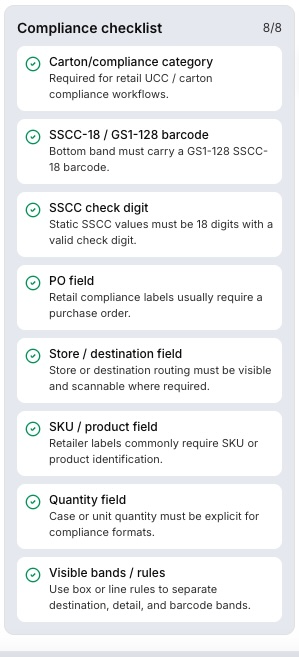
The checklist covers the things retailers actually reject shipments over:
- Carton / compliance category assigned for retail UCC workflows
- A GS1-128 SSCC-18 barcode present in the bottom band
- SSCC values are 18 digits with a valid check digit
- Purchase order field present
- Store / destination routing field visible and scannable
- SKU or product identification present
- Case or unit quantity stated explicitly
- Visible bands or rules separating destination, detail, and barcode
Catching a missing PO field on screen costs nothing. Catching it at a retailer's receiving dock costs a chargeback, a return, and a strained account relationship.
Test Your Eye: Can You Spot the Compliance Error?
See if you can catch what Label Studio catches automatically. Three labels, three questions, no pressure.
Would this carton label pass a retail compliance check?
10. Packing Slips and Warehouse Documents
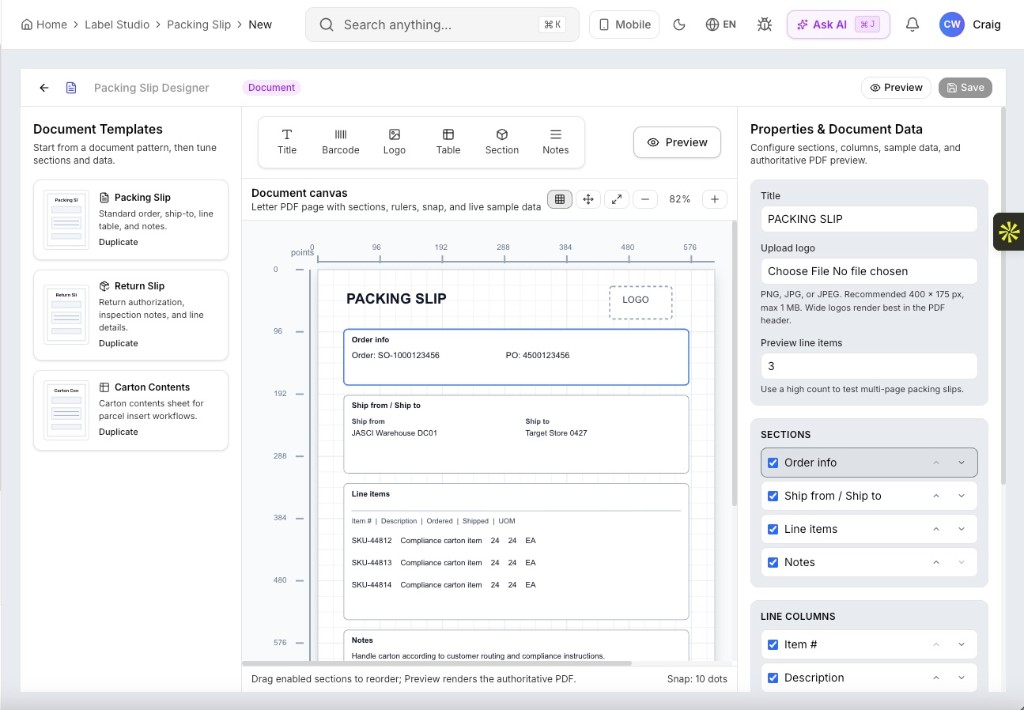
Not everything that prints is a 4×6 thermal label. Label Studio includes a document designer for letter-size PDFs, such as packing slips, return slips, and carton contents sheets, built from the same visual, data-bound approach. Within this AI-native system, those documents draw from the same live operational context and adapt their content to the order, customer, and workflow without duplicating configuration.
Reorderable Sections
Toggle and drag order info, ship-from / ship-to, line items, and notes into the sequence you want.
Configurable Columns
Choose which line columns appear: item, description, ordered, shipped, UOM.
Authoritative Preview
Set a high preview line count to test multi-page behavior before go-live.
11. What It Means for the Business
For operators and floor teams
- Clear, accurate labels that pull real order data automatically, with fewer mis-ships and mistakes
- Consistent labels across every station, so what prints is always what is expected
For admins and implementers
- Build and edit labels yourself with a visual designer, no coding, no tickets, no waiting
- Support the labels the real world demands: receiving, putaway, replenishment, location, LPN, compliance, and packing slips
- Make a change in minutes when a carrier or retailer updates their requirements
For the business
- Fewer chargebacks and rejected shipments from labels that meet carrier and retailer rules
- No costly third-party label software or custom development to maintain
- Faster onboarding for new customers, since their label formats can be built and adjusted on the spot
Control your own destiny
The strategic point is not that labels get easier. It is that a category of work that used to require an outside specialist now belongs to the people running the operation. Retail compliance requirements change constantly, and the operations that absorb those changes in minutes rather than weeks are the ones that stop paying for them. Our AI-native system connects label decisions to broader warehouse performance, turning changes, exceptions, and errors into recommendations that improve throughput, service, and cost control.
12. Frequently Asked Questions
Do I need a developer to use Phoenix Label Studio?
No. Label Studio is a visual drag-and-drop designer. You place text, barcodes, logos, boxes, and lines on a canvas, bind each element to a database field, and save. If you can build a slide, you can build a label. Because the Phoenix AI-native system shares operational context across the platform, teams receive more consistent guidance and answers without switching to separate tools or manual research.
How many compliance label templates ship with JASCI?
JASCI includes a library of 100+ retailer compliance label templates covering major retailers, club stores, department stores, and specialty chains. Every template can be duplicated and customized for your specific operation, and more are added as retailer requirements change.
Can Label Studio generate ZPL code?
Yes. Designs render to ZPL for direct-thermal and thermal-transfer printers, so what you place on the 203 DPI canvas is what the printer produces. Packing slips and other document formats render as PDFs.
How do labels get real order data?
Each element on the canvas is bound to a field in the JASCI database, spanning order, customer, location, LPN, product, carrier, and compliance data sets. At print time the label pulls the live value, so there is no manual entry and no stale data.
Does this replace my third-party label software?
For most operations, yes. Label Studio eliminates the pattern of designing labels externally and then integrating that output with the WMS. Design, validation, data binding, and printing all happen inside the same platform.
The Bottom Line
Labels are small, but getting them wrong is expensive. Label Studio turns one of the warehouse's most tedious, developer-dependent tasks into something anyone on your team can do in minutes, accurately, and on their own terms.
The Label Studio is just another way the JASCI Phoenix AI-Native WMS is giving control back to its users.
See Label Studio in Action
Book a demo and we will design a live compliance label against your routing guide, complete with barcodes, data binding, validation, and ZPL output, in the same session.