Why 3PL Billing is Built Into Phoenix
In many 3PL warehouses, inefficient billing processes prevent completed work from becoming billable revenue, especially when activity cannot be matched reliably to the correct client rule. Extra touches, relabeling, storage transitions, minimums, and accessorials are especially vulnerable. When finance has to reconstruct that work from spreadsheets, carrier systems, and email, invoices slow down and disputes become expensive investigations.
Phoenix brings charge codes, client profiles, versioned rate cards, warehouse activity, billing runs, and invoices into one system. If Phoenix directed, confirmed, and recorded the work, the billing team can use that execution record to calculate and explain the charge. AI helps guide rate configuration, while finance retains control over review and approval. The result is a billing process built around completed work, client terms, and an audit trail that can answer what happened, when it happened, and why it was billed.
What the AI does: AI drafts a pricing rule from contract language. A finance user checks and approves the charge code, rate, unit, and conditions before the rule is used. Phoenix applies the approved rule to recorded warehouse activity and presents the resulting charge for review before invoicing.
Illustrative example: A contract says “$18 per pallet per day after five free days.” AI proposes a storage rule with that rate and free period. After finance verifies and approves the rule, three pallets held for two billable days produce six pallet-days of recorded activity and a $108 charge for review on the client bill.
Product status: JASCI’s September 2026 announcement listed October 2026 as planned general availability for Phoenix. The screenshots below show a preview demonstration of the billing workflow.
How an AI-Native WMS Connects Execution to Billing
AI-native 3PL billing includes three connected processes:
- Billable events originate from warehouse execution, not manual re-entry.
- Rate logic is modeled as versioned, auditable rules on rate cards tied to each client.
- AI guides the creation of rate rules that finance reviews before they affect a bill.
In Phoenix the full 3PL billing stack can be managed from the sidebar: Charge Codes, Adjustment Reasons, Clients, Rate Cards, Bills, Invoices, and Activity. From charge code through invoice, each record stays connected to the client, rate card, and underlying warehouse activity.
Rate cards
Versioned contracts with effective dates, rules, and simulation hooks.
Clients
Billing cycles, terms, and default rate cards per 3PL customer.
Activity
Execution-sourced billable events with traceability to warehouse work.
The Complete 3PL Billing Workflow
Follow this demonstration to see how Phoenix configures client pricing, captures billable activity, preserves review controls, and produces an invoice that can be traced back to warehouse work.
Phoenix Billing Process:
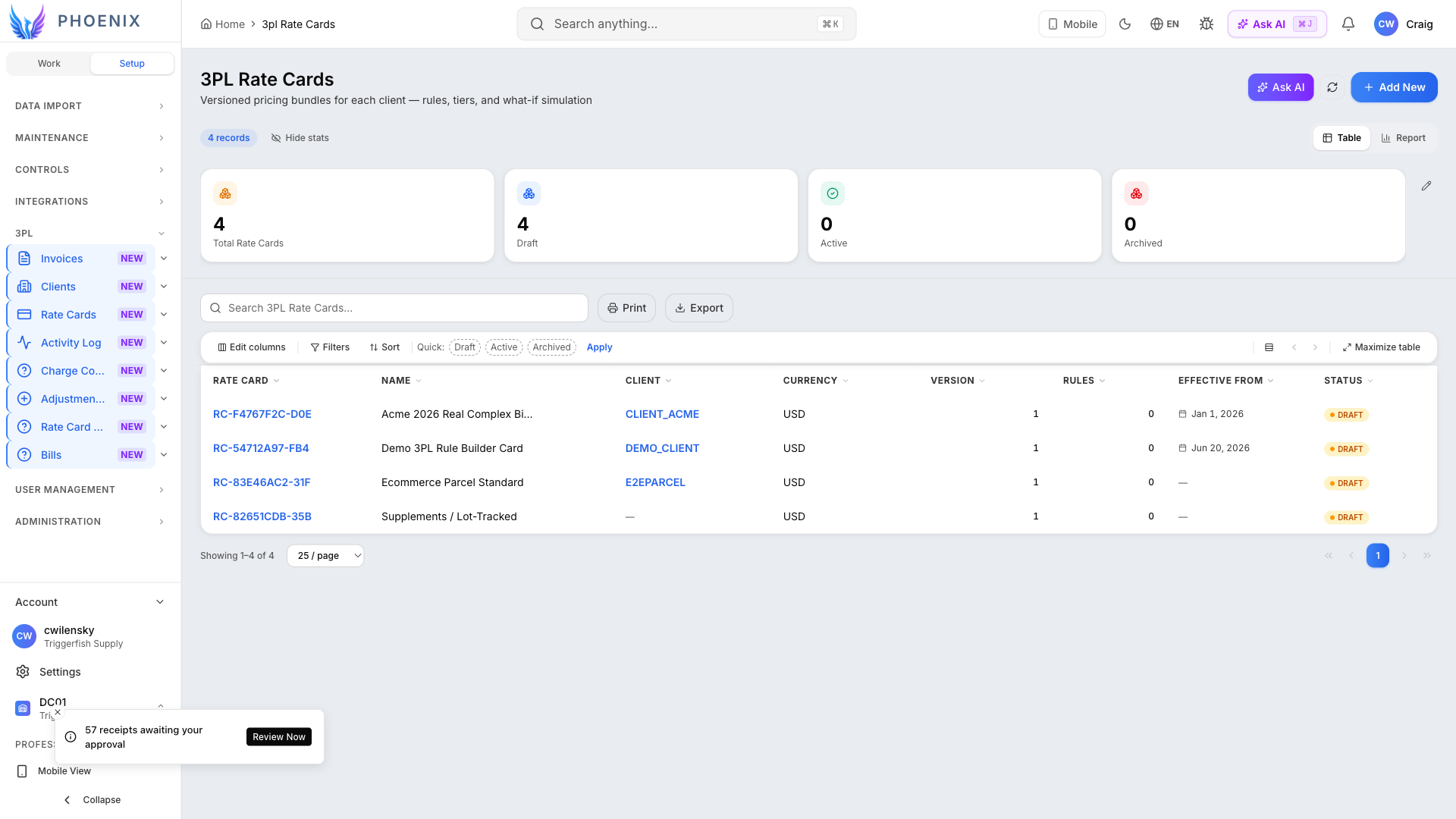
1. Organize client pricing in the rate card library
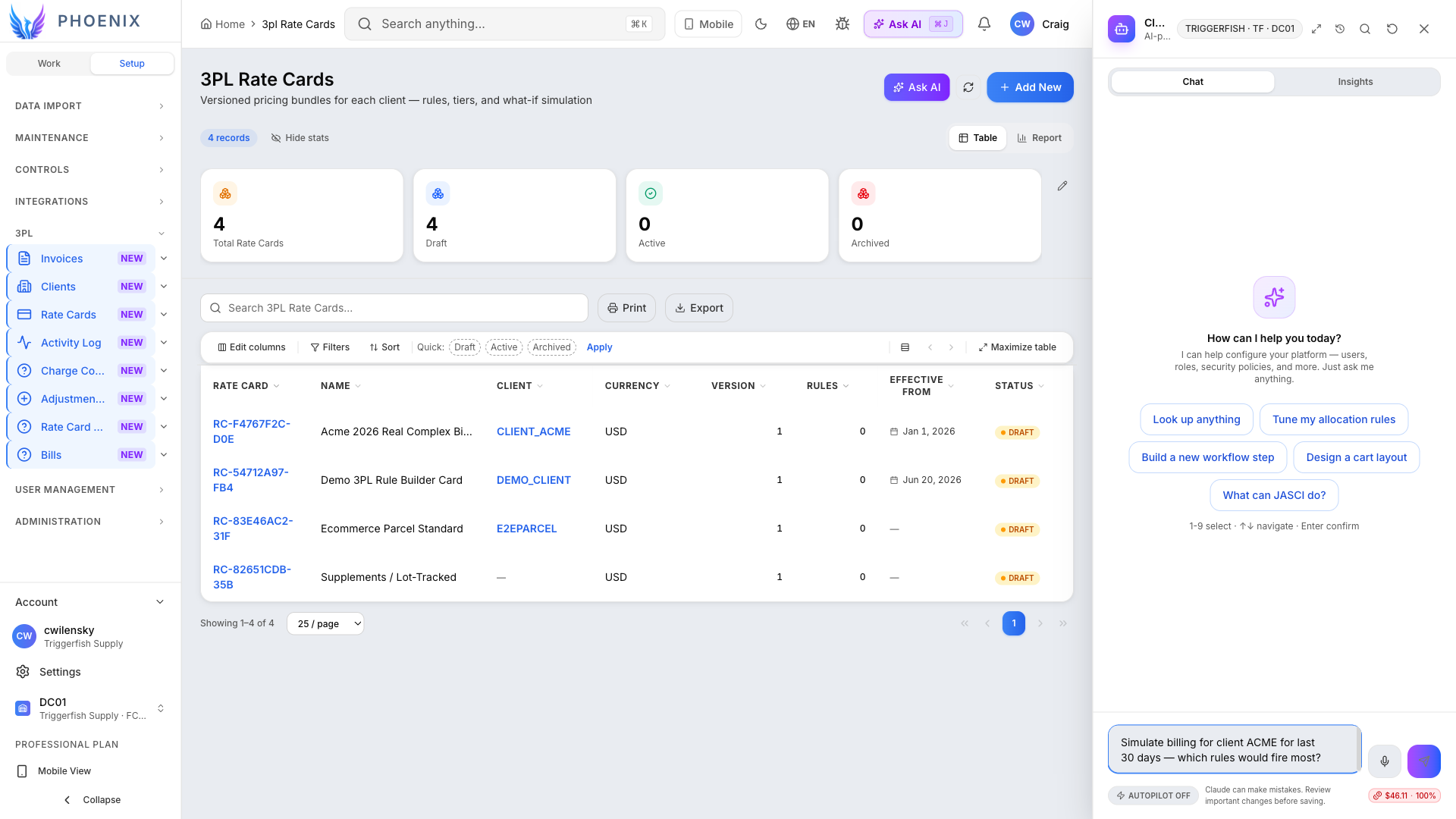
The Rate Cards screen is where finance and implementation teams store every executable version of a client agreement. Each row is a rate card: a named bundle of rules, currency, effective dates, and status (draft or active) tied to a specific 3PL client company. From this list you can open a card, update rules, clone it for a renewal, or assign it to a client. Because every rate card is versioned, your team can identify the exact pricing logic behind an earlier bill.
Summary tiles show total cards, drafts awaiting review, active cards, and cards nearing expiration. Selecting a tile filters the library, giving billing teams a quick way to find unfinished setup or prepare for renewals.
2. Review the client’s versioned rate rules
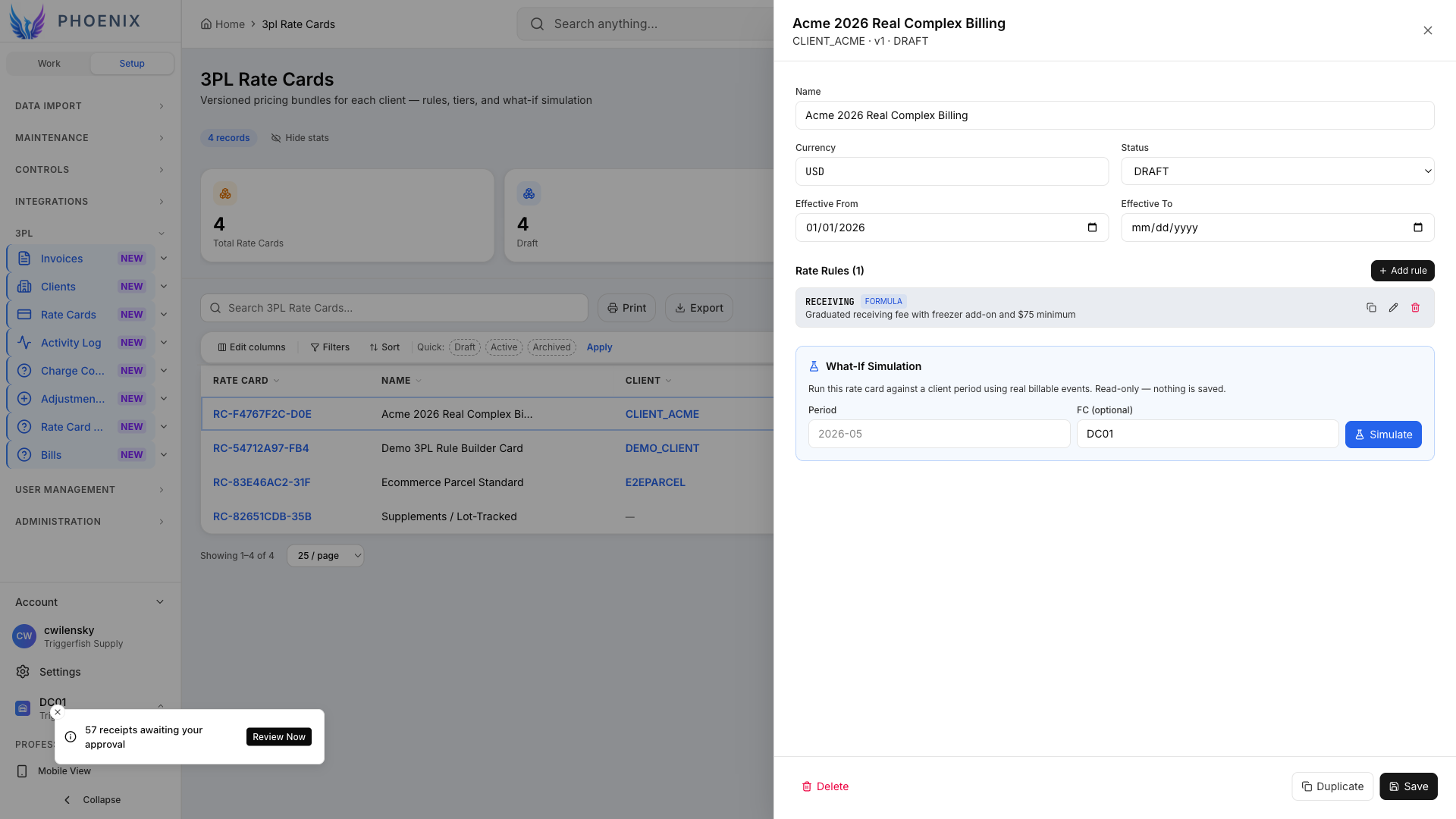
Opening a rate card shows the commercial details and calculation logic behind the client agreement:
- Client and rate-card status
- Effective dates and version
- Currency
- Charge codes and pricing units
- Tiers, minimums, and conditional rules
Rules are evaluated when you run a bill. They can be added manually or drafted with AI for human review. Editing a rule does not rewrite history: posted bills retain the rate-card version used to calculate them. Breaking receiving, storage free days, outbound minimums, and other charges into separate rules makes later activity and invoice lines easier to explain.
3. Convert contract language into a draft billing rule
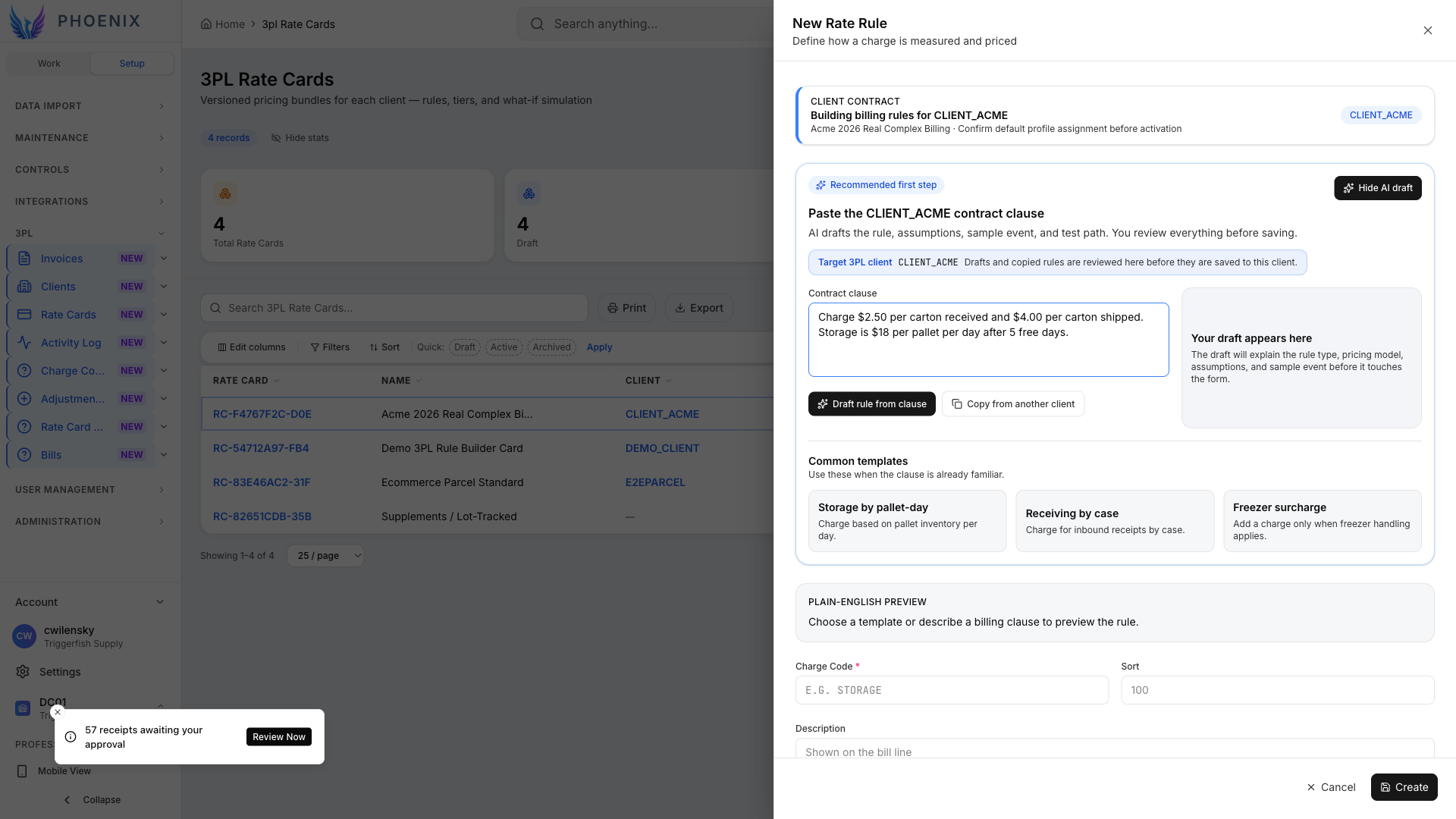
When you add a rule, you can paste a paragraph directly from the client’s schedule of rates—the same language your lawyer or account manager already approved. The contract clause field accepts natural language: per-carton received, per-carton shipped, pallet-day storage after free days, pick fees, VAS surcharges, and so on. You are not forced to translate into a proprietary matrix before the system understands you.
Select Generate AI draft and Phoenix proposes the charge code, unit, rate, and conditions. Finance reviews the result and decides whether to edit, save, or discard it; nothing is posted automatically.
The assistant works within the client’s rate-card context and the operator’s charge-code catalog. The output remains an auditable candidate until finance deliberately promotes it to the rate card.
4. Preview the proposed rule for finance approval
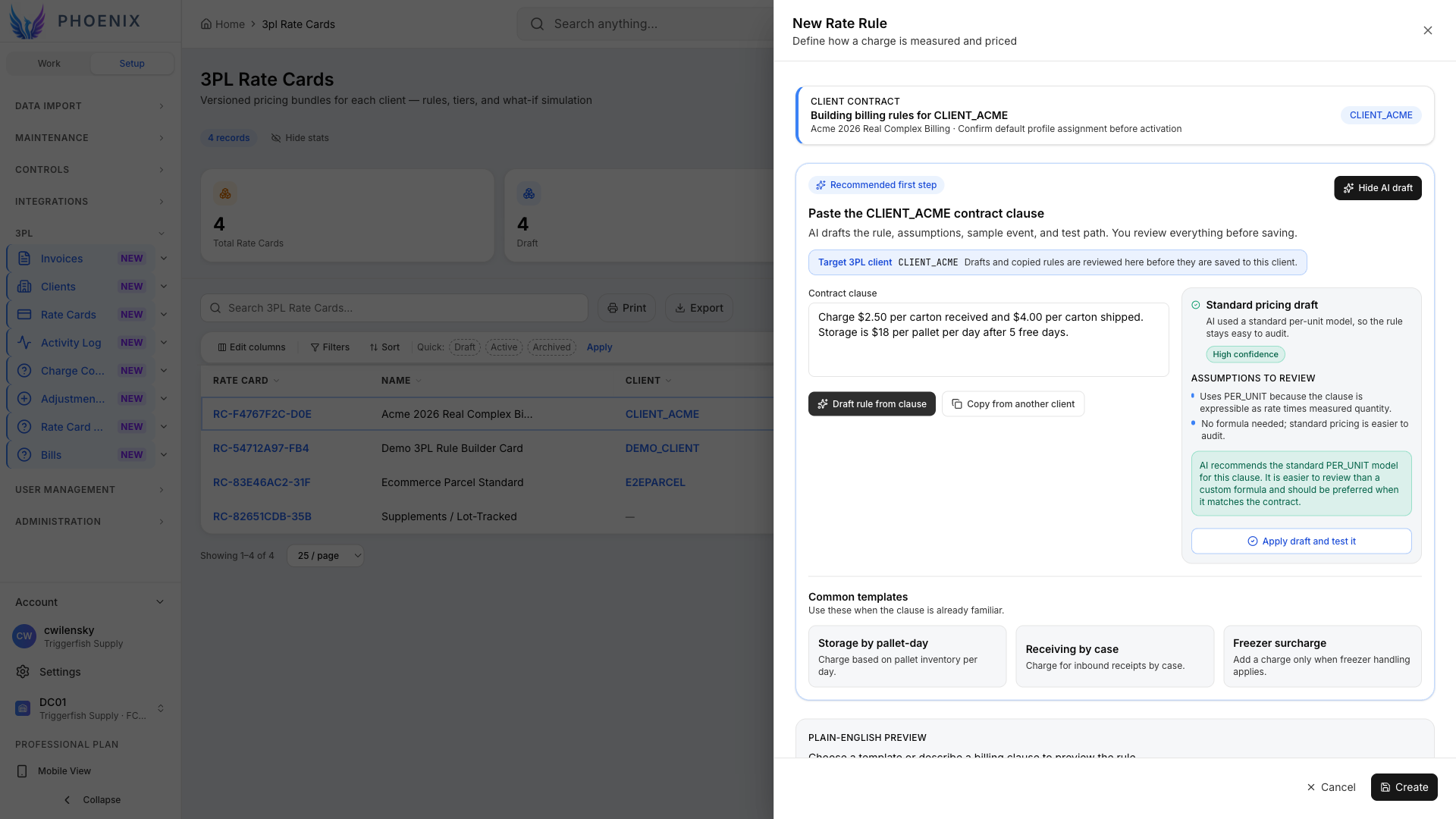
Phoenix shows a preview of the proposed rule, including its pricing method, quantities, charge code, conditions, and assumptions. Analysts compare the preview to the source PDF line by line. If the draft missed a free-storage window or misread a unit of measure, they edit inline or regenerate with a clearer clause. Only when the preview matches commercial intent do they save the rule onto the card. For example, “$18 per pallet per day after five free days” becomes explicit storage logic that the billing engine can apply consistently.
Once approved, that same structured rule is available to the next bill run and to pre-bill simulations. This keeps contract interpretation, human approval, calculation, and later explanation connected.
5. Connect warehouse activity to billable events
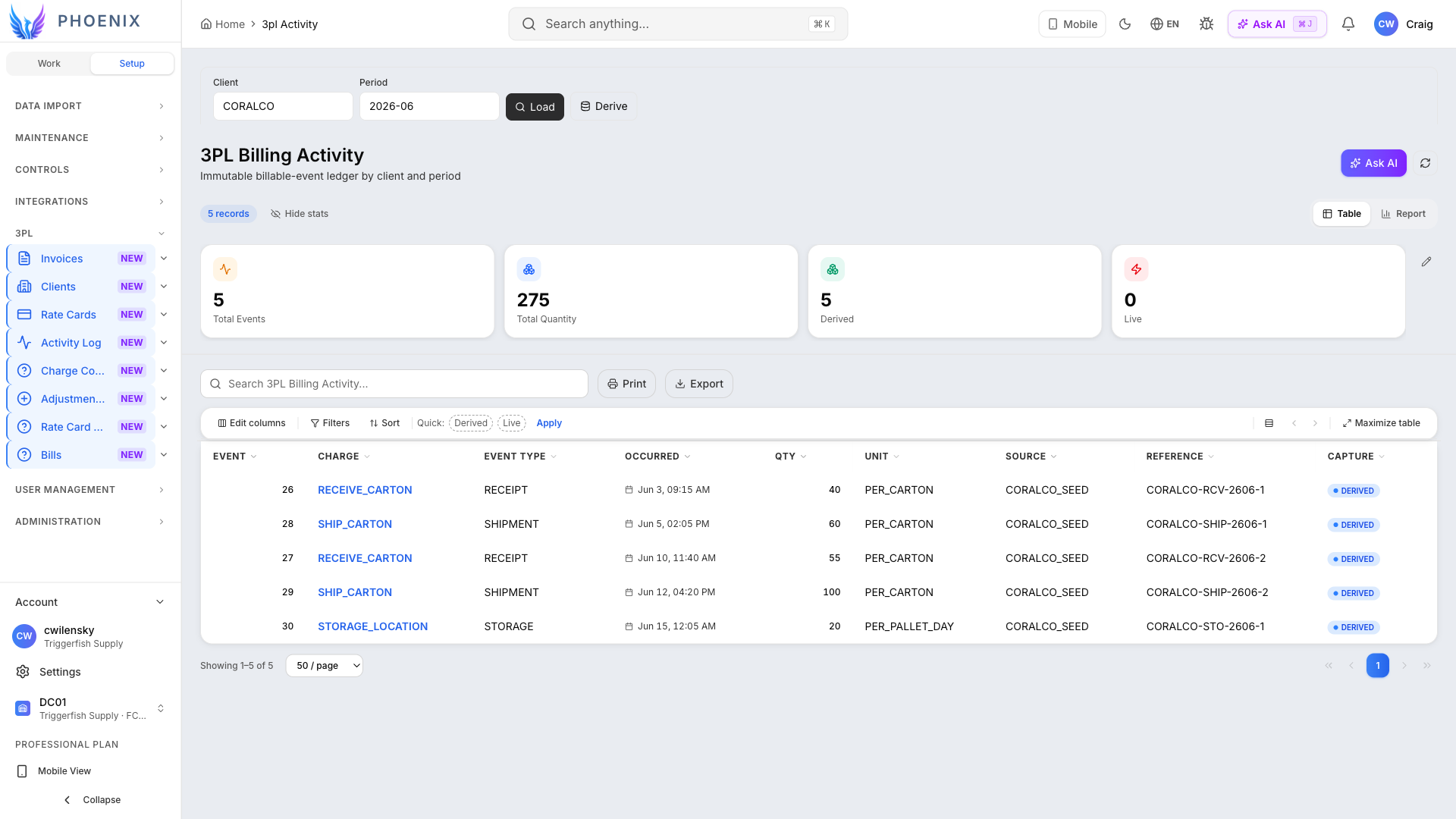
The 3PL Billing Activity screen answers a crucial question for finance and operations: “What billable events did we record for this client during this period?”
Each billable event preserves the details needed to understand and defend the charge:
- What warehouse activity occurred
- When it happened and which client it belongs to
- The source order, shipment, or warehouse task
- Quantity and unit of measure
- The rule or condition that triggered the charge
The ledger can also show the fulfillment center and whether an event was captured live or derived from operational records. Authorized administrators can backfill receipts, shipments, or storage snapshots for a period when warehouse data arrives late, without duplicating events that were already captured.
When a client disputes an invoice line, this is the first screen you open. You do not argue from a pivot table; you show the event ledger, then the rate card rule that priced those events, then the posted bill line that rolled them up.
6. Calculate the bill and route it for approval
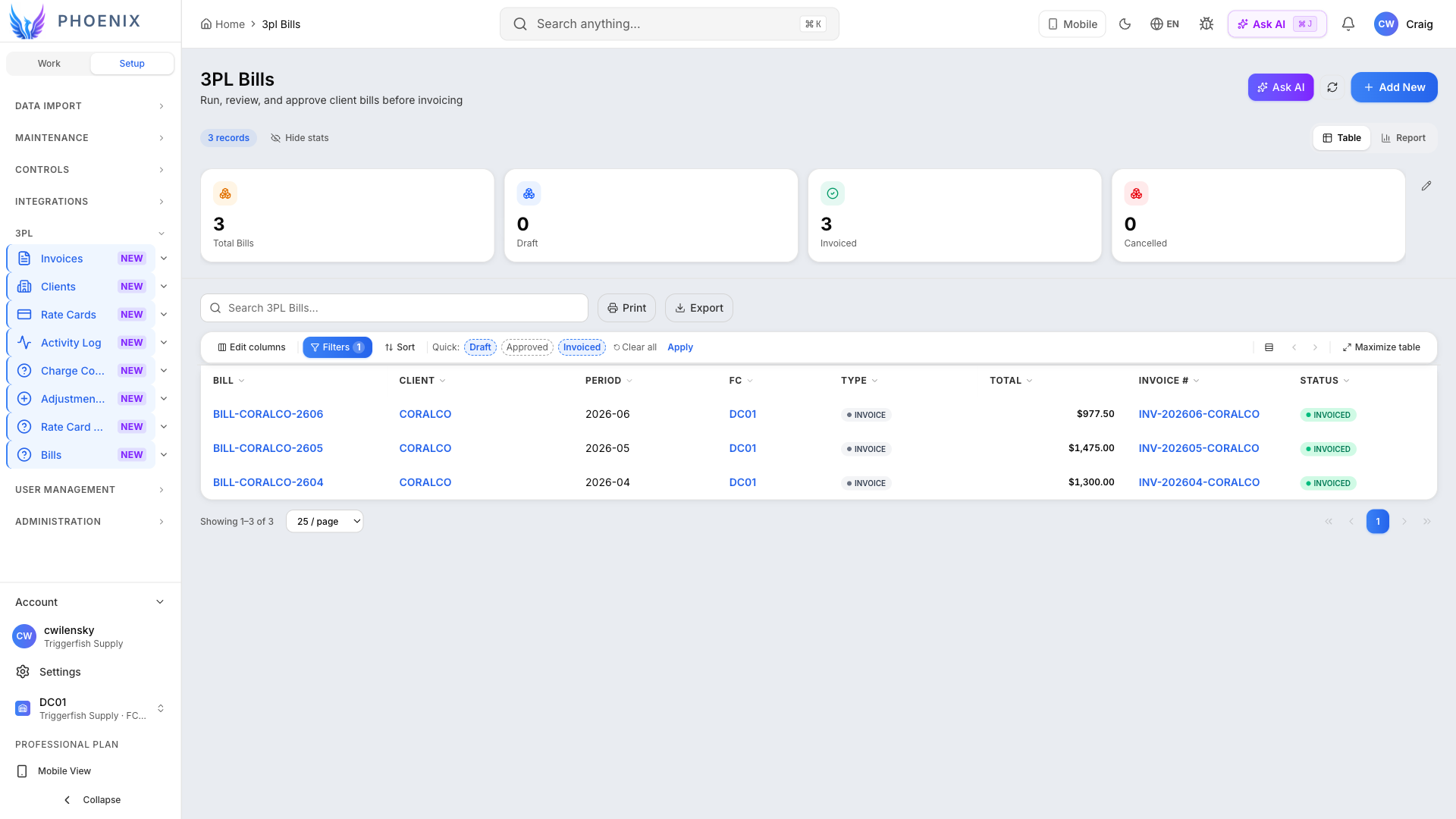
The 3PL Bills screen is the worksheet lifecycle: draft → reviewed → approved → invoiced (or cancelled). Each row is one bill for a client and billing period, with totals, fulfillment center (FC), bill type, and status badges.
Draft→Reviewed→Approved→Invoiced
Use Run bill (manager and above) to generate or regenerate a draft from billable events plus the effective rate card. The engine groups events under rules, computes line amounts, and leaves the bill in DRAFT for human review. Overrides and adjustments happen on the bill detail panel before approval.
Filters for Draft, Approved, and Invoiced help supervisors focus on the bills that need attention. Bills are the internal control document; invoices (next screen) are the client-facing artifact. Keeping both in Phoenix means your AR team does not re-key totals into another system, and audit can trace every dollar from event → rule → bill line → invoice number.
7. Create the client invoice from the approved bill
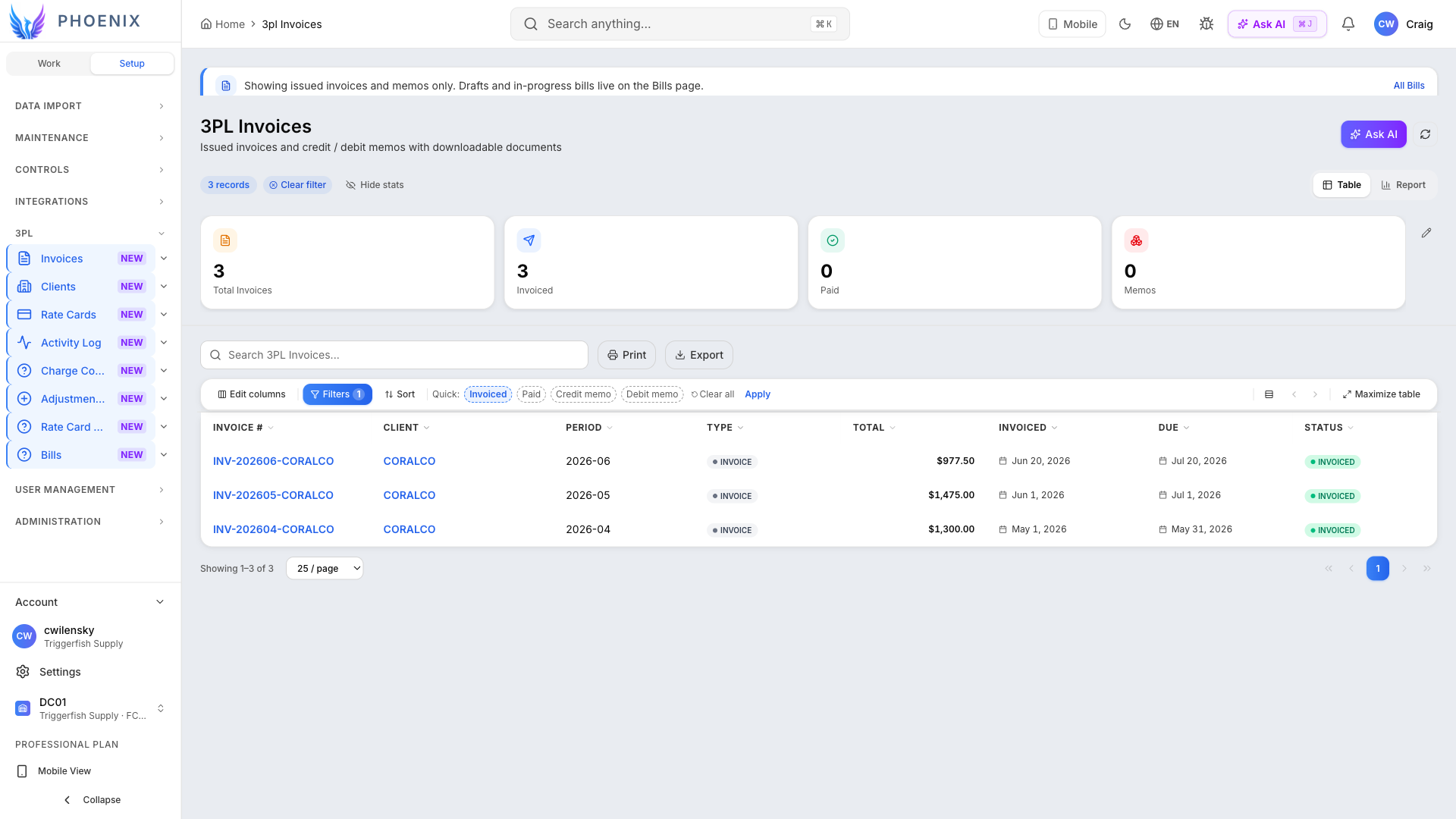
The 3PL Invoices view gives accounts receivable the invoice number, issue and due dates, total, status, and supporting detail for each client invoice. Approved billing activity becomes the client-facing invoice without requiring the team to re-enter its totals elsewhere.
Phoenix carries the approved bill lines forward, calculates the due date from the client’s payment terms, and freezes the financial document for delivery. Teams can update presentation details such as a PO reference or cover note, while changes to billed amounts follow a formal credit or debit process.
Because invoices connect to bills and billable events, the team can answer a client question by following the charge back through the billing workflow. The result is an invoice built from the same activity and pricing rules that warehouse supervisors and finance already reviewed.
8. Apply the client’s billing profile
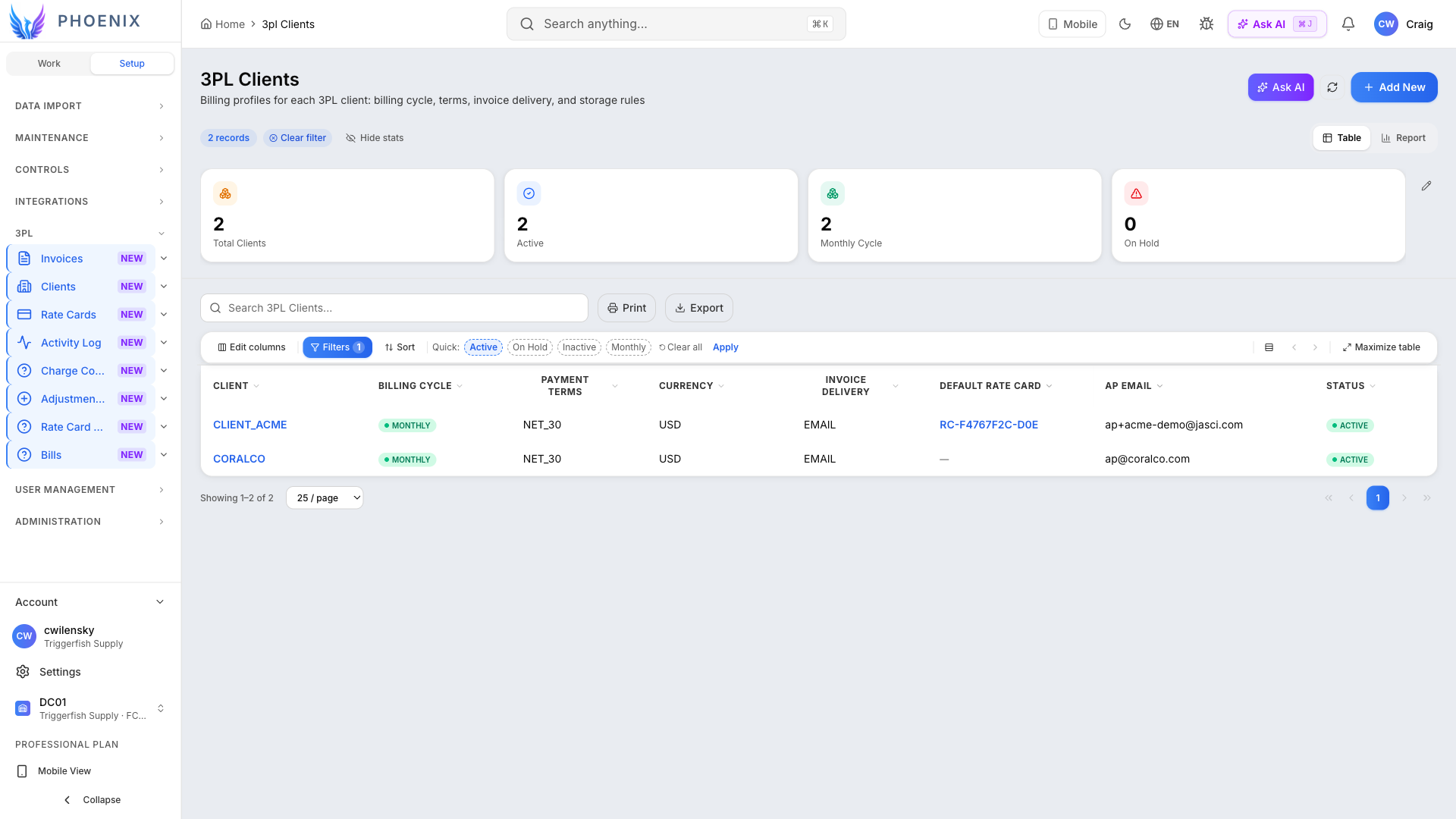
Every 3PL customer gets a billing profile that controls the essential invoicing settings:
- Billing cycle and payment terms
- Currency
- Invoice delivery preference and AP contact
- Storage basis and optional ERP customer reference
- Default rate card
- Active or inactive billing status
Client setup is the glue between commercial onboarding and operations. Implementation teams complete this profile when a new client signs; finance verifies that the default rate card matches the executed contract before the first live bill run. Profiles also carry an active or inactive billing status, which helps prevent accidental bill runs for departed clients. Guided assistance helps administrators complete the required fields when onboarding a new customer.
9. Simulate charges and explain the result
The AI assistant opens beside Rate Cards with the relevant billing context already in place. You can ask questions in plain language, test charges for a client and date range, or request a starting point for a new rate card. Use the rule form when you have contract language ready to enter, and use the assistant to explore possible outcomes or understand which rules would apply before finance approves a bill.
Simulation uses the same rate rules and calculation logic as the billing workflow, rather than a separate estimate. That lets teams test a new contract or investigate an unexpected result before anything reaches an approved bill.
Where Phoenix 3PL Billing Delivers the Most Value
Separate rate cards per brand, shared charge-code catalog, activity filtered by client. Finance posts one bill per customer per period without re-aggregating warehouse exports. Site managers use the same KPI analytics row on bills and activity that they already know from orders or inbound, no separate “billing portal” login.
Sales sends a PDF schedule; operations paste clauses into AI rule draft, promote rules, link the client profile, and simulate a month before go-live.
Pallet-day and free-day rules live on the rate card; activity from inventory snapshots and movements feeds the billing engine.
Per-carton ship charges and pick fees attach to execution events; supervisors use analytics on bills and activity to spot drift vs. forecast.
Client questions a line: open activity, trace to warehouse work, show the rate card version effective that day. AI can summarize which rules applied.
Version a new rate card, effective next quarter, without losing history. Test the new pricing before assigning it as the client’s default.
Measurable ROI for 3PL Operations
ROI varies by client count and billing complexity. Benchmark manual setup, close timing, dispute-resolution effort, and billing-system consolidation against your current process. Your Phoenix team can model potential impact against your client mix, volumes, labor costs, and software costs.
Revenue protection: Compare billed accessorials with recorded warehouse events to identify missed charges.
Cost avoidance: Measure hours spent re-keying and resolving integration issues between WMS and finance.
Speed: Track how long it takes to configure and launch billing for a new client.
Finance leaders should pair these metrics with a simple baseline: hours spent per billing cycle, dispute count per million dollars billed, and days from period close to invoice send. Phoenix gives you the operational screens to measure improvement month over month without standing up a separate BI project for billing alone. IT leaders benefit from one authentication model, one deployment footprint, and one API surface for extensions. When billing logic changes, you version rate cards instead of redeploying a brittle integration map between systems.
Operational and Financial Benefits of Unified 3PL Billing
Single source of truth
Execution and billing share one platform — fewer exports and fewer “which spreadsheet is right?” meetings.
Faster rate card rollout
AI drafts rules from contract language so analysts spend time validating, not re-keying matrices.
Audit-ready
Versioned rate cards, activity logs, and posted bills give defensible answers in client disputes.
Shorter close
Billing runs and invoice lists are operational screens — not a separate close project every month.
Scale clients
Add 3PL customers without multiplying shadow billing systems — clone rate cards and tailor rules.
Warehouse managers gain predictability: when charge codes align to work types they already supervise, there is no surprise “billing adjustment” email on Tuesday. CFOs gain forecastability: posted bills and open activity are queryable before period end, not after someone merges pivot tables. Client success teams gain credibility: invoices tie back to operational truth your portal or EDI can reference later.
Common Questions
Is this a separate product from the WMS?
No. 3PL billing is part of Phoenix. Warehouse events feed billing activity in the same system, so teams can move from operational work to invoices without rebuilding the data elsewhere.
Does AI post charges automatically?
No. AI drafts rate rules and answers simulation questions; humans promote rules and post bills. That keeps finance in control and preserves auditability.
Can we run multiple rate cards per client?
Client profiles link to default rate cards; rate cards are versioned with effective dates so renewals and amendments are explicit. Your team can model complex deals with multiple rule rows on one card.
What about adjustments and credits?
Adjustment reason codes are typed lookups. Bills and invoices support the adjustment patterns your finance team configures — aligned to charge codes rather than ad-hoc spreadsheets.
Do we need a separate billing consultant to implement?
Most teams start with charge codes and one pilot client, then expand rate cards. AI drafting reduces the need for outside analysts to translate PDFs — your subject-matter experts validate instead of retyping.
Can we trace an invoice charge back to warehouse activity?
Yes. Invoice lines connect to posted bills, the rate-card version used for calculation, and the underlying billable events, giving finance a clear path for answering client questions and resolving disputes.
See JASCI Phoenix 3PL billing in action
Bring a real client contract to a personalized demonstration. Our JASCI team can show how Phoenix connects the contract terms to warehouse activity, billing review, and a traceable invoice.
Schedule a billing demo